In the world of digital marketing, most of us turn to the Google Ads platform for reachability, targeting, brand building, and result measuring. But what should you do if you want to improve ad performance in Google Ads without increasing your budget?
The answer is simple: Google Ads Assets!
With the right application, Google Ads Assets can elevate your ad performance while saving you money. Continue reading this comprehensive guide to precisely understand what each asset type offers and which is best suited for your business.
What Are Google Ads Assets?
Formerly known as Extensions, Assets are dynamic snippets of information or interactive elements that appear alongside ads on Search Engine Results Pages (SERPs). In short, assets communicate value-adding details to potential customers before they click on your ad.
Many different types of assets are available, each serving a unique purpose for your business. As of early 2023, there are 11 types of assets that can be used with your Search Ads, which are:
- Sitelink Assets
- Callout Assets
- Structured Snippet Assets
- Call Assets
- Lead Form Assets
- Location Assets
- Affiliate Location Assets
- Price Assets
- App Assets
- Promotion Assets
- Image Assets
Valuable Benefits of Google Ads Assets
Google limits normal search ads to 30-character headlines, 90-character descriptions, and a single web link in each. However, assets allow you to exceed those limits and deliver more to your audience.
While each type of asset has a unique benefit to your business, they can collectively serve six major advantages to your ad performance. These advantages are:
- Increased Visibility. Expanding the real estate of your ads on the SERPs grabs the user’s attention. It also increases your opportunity to attract a lead, and, at the same time, it takes attention away from competing businesses.
- Increased Relevance. Google shows assets that are most relevant to a search query. Supplying meaningful information can make your ad a top contender for users looking for specific details. While there is no limit to how many assets you use, Google recommends only using assets relevant to your business or service.
- Increased Click-Through Rate. Click-through rate (CTR) is a good indicator of ad performance, and a high CTR can improve the Ad Rank and Quality Score in the eyes of Google. Once a user sees these relevant details about your business, they trust their click will lead to a promising website.
- Generate Better Lead Quality. Ads alone may not provide enough information for a user to know if you’re the right business for them. Therefore, assets help weed out poor-quality leads and only send customers who are likely to convert to your website.
- Drive Conversions and Foot Traffic. Due to the quality of customers clicking on your ad or assets, conversions are likely to increase both on and offline. In addition, some asset types like Call and Form Leads can convert users directly without navigating to your website.
- Save You Money. The best is saved for last! Assets are not only free to use in Google Ads, but they also save you money in ad spend. By improving CTR, Quality Score, and Ad Rank, Google rewards advertisers with a less expensive cost-per-click.
Types of Ad Assets
Below we’ll take a look at what each asset type looks like and the benefits they serve.
Sitelink Assets
Sitelinks offer up to six additional links below your original ad. Providing more information about the product or service helps users quickly find what they’re looking for. Sitelinks also allow advertisers to showcase additional offerings and drive more website clicks.
Sitelink Benefits:
- Drive additional clicks to your website.
- Help take up more real estate on the SERPs.
- Fulfill each user’s search intent with relevant content within your website.
Sitelink Best Practices:
- Each link should take users to a unique, valuable page that is accurately represented by your sitelink’s label.
- User intent and ad relevance should determine whether to apply sitelinks to the Account, Campaign, or Ad Group level. Sitelinks can be broadly applied to the account level or offer more granular information at the ad group level.
- You should always create at least six sitelinks, which is the maximum Google can show below your ad. However, Google can accurately select the most relevant sitelinks, which means creating up to ten for Google to select from is recommended.
Callout Assets
Callouts provide extra informational text to users. The text in callouts is usually short, concise, and to the point, making it easy for users to quickly understand the key messages of an ad.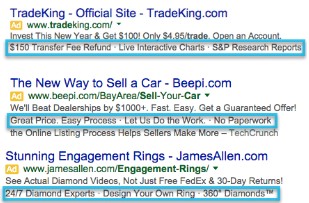
Callout Benefits:
- Highlight unique features and business details that may not fit in your ad copy.
- Update information without altering your original ad or disrupting its progress.
Callout Best Practices:
- Though there is a 25-character limit when creating callout assets, keeping the text under this limit can allow more callouts to show below your ad.
- Include specific, meaningful features or values that catch users’ attention and distract them from the competition.
Structured Snippet Assets
Structured Snippets display a list of specific product or service categories, such as “types of cuisine” or “brands.” These categories show users the full picture of your business in just a few words.
Structured Snippet Benefits:
- Set custom categories that are unique to your business.
 Better fulfill a user’s intent with meaningful values.
- Make the customer’s journey more convenient with details they no longer would need to look for on your website.
- Generate higher quality leads with better-informed users.
Structured Snippet Best Practices:
- Try to group at least four related values per header. If you can, creating more than one header-value set gives Google more options when pairing relevant assets with your ads.
- If mobile ads are a priority to your advertising, you should keep values under 12 characters to increase the likelihood of your asset showing properly on mobile devices.
Call Assets
Calls can be triggered from ads through phone numbers or clickable phone icons that can appear with a text ad in search engine results. This allows users to quickly call a business directly from the search results page.
Call Benefits:
- Users can easily get in contact with your business.
- Encourages users to make calls directly from your ads, which increases call conversions.
- Increase click-through rates and user engagement with customers interested in your business.
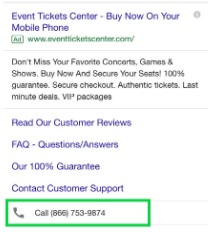
Call Best Practices:
- Ensure your business can manage the volume of calls received from ads, or consider using a call agency.
- Set your Call Assets to show only during your company’s business hours when someone can answer the phone.
Lead Form Assets
Lead forms intend to make it easier for users to provide their information on their mobile devices. Completing a lead form can trigger a notification to the business, allowing them to follow up with the potential customer.
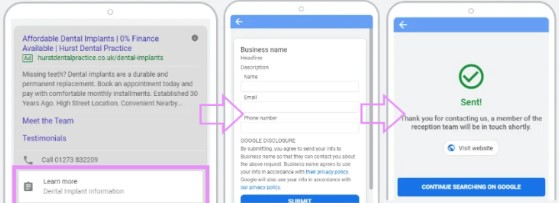
Lead Form Benefits:
- Engage customers that already have an interest in your business.
- Capture user information directly from your ad.
- Get more conversions by driving leads into your marketing funnel.
Lead Form Best Practices:
- When creating Lead Form Assets, you can optimize for either ‘more volume’ or ‘more qualified‘ leads, which may adjust the fields when collecting customer information.
- The form can include fields for name, email, phone number, and other information that your business may find valuable. It’s important to set fields unique to your market.
Location Assets
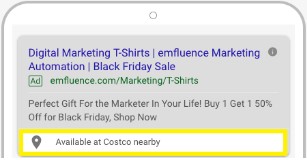
Locations make it easier for users to find a business’s location and to drive more foot traffic to it. Location assets can also show the proximity of a business to a user’s location, increasing relevance and engagement with the ad.
Location Benefits:
- Increased click-through rates and engagement with local searches.
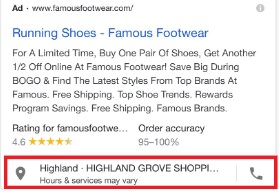
- Increased click-through rates and engagement with local searches.
- Show customers that you are nearby and accessible, whether you have a physical location or not.
Location Best Practices:
- First, you must create a Google Business Profile (GBP) to enable Location Assets, where general business information is recorded. Afterward, link your GBP to your Google Ads account.
- Using only one GBP account is recommended to ensure Location Assets run properly.
Affiliate Location Assets
Affiliate Locations are similar to Location Assets but apply to products sold through other retailers – for example, if you sold your products through Target or Walmart. Users can see where specific products are being sold near them.
 Price Assets
Prices are displayed as images or videos that show the cost of a product or service and help consumers make informed purchasing decisions. Price assets can include the price of a single item, a range of prices for different products, or special pricing promotions.
Price Benefits:
- Enhances your ad’s visibility by expanding real estate on the SERPs.
- Increased click-through rate with highly interested purchasers.
 Price Best Practices:
- Price Assets only show for top-position ads, meaning having a strong relevance and high Ad Rank will be very helpful if you want these assets to generate good results.
- Accurate information is very important when displaying the cost of your product or service. Manual updating may apply to Price Assets if the cost of your products or services changes.
App Assets
Apps are shown on mobile devices only. They appear as images, videos, or icons that grab the user’s attention and entice them to download your app. Using App Assets can help increase the relevance and effectiveness of an app install campaign, leading to higher downloads and user acquisition.
App Benefits:
- Increased user engagement.
- Drive more conversions through application downloads directly from your ads.
App Best Practices: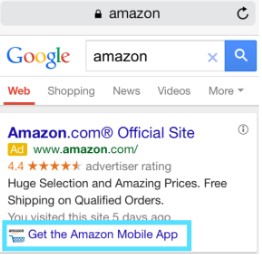
- App Assets should only be implemented if your business offers an application that runs in the Google Play Store or the Apple App Store. In addition, an app ID (iOS devices) or Package Name (Android devices) and a page URL within the app store are necessary for App Asset setups.
- While you can create multiple, only one App Asset can show alongside an ad. Be sure your app is most relevant to the ads you are pairing it with.
Promotion Assets
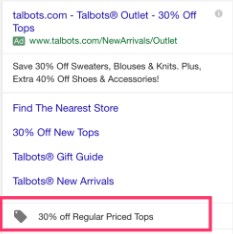
Promotions allow advertising scheduled specials below your ad. Weekend promos, seasonal deals, or holiday sales can all be set to run when needed. This hands-off approach prevents the need for manual updates or future scheduling.
Promotion Benefits:
- Schedule current and future promotions without manually updating or changing your ad copy.
- Stand out against the competition in the SERPs.
- Increased conversion rates and click-through rates.
Promotion Best Practices:
- Your Promotion Asset is clickable and should send users directly to a page that exhibits your deal. Along with this, the details in your asset must accurately reflect the details on your website.
- Using start and end dates will avoid the need for manual updates later on and keep you from overlooking an inactive promotion running with your ads.
Image Assets
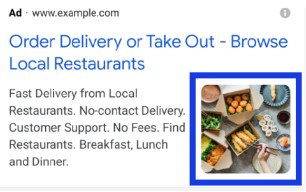
Images make an ad immediately eye-catching to users. These assets can display products, logos, or other relevant images that help explain what a business offers. They can also be used to show different aspects of a product or service, helping to provide a more comprehensive view for users.
 Benefits:
- Visually appealing to users.
- Increased click-through rates.
- Increased relevance.
- Generates high-quality leads.
Best Practices:
- There are certain requirements for image assets, including a Google Policy history of compliance, a Google Ads account that has run for at least 90 days, and an accrued spend for a minimum of 28 days.
- The maximum number of uploads is 20 high-quality images that fall into a 1×1 square ratio or 1.91×1 landscape ratio.
Static vs. Dynamic Ad Assets
Each of the assets mentioned above can be static and manually created, or you have the option of Google creating dynamic, automated assets for you. These automated assets show exactly the same as static assets, though these are automatically created from your landing page, existing assets, and directly from your ad.
Dynamic assets are recommended for large businesses wanting to scale their assets without manual work. However, you must have static assets in place before Google can create dynamic assets.
Just about every type of asset can be dynamically optimized by Google. However, automated images are not recommended because Google is less efficient when interpreting pictures as opposed to when interpreting text.
Key Takeaways
Each type of asset is unique and serves a specific purpose to a business. Remember that assets are free to use, which means every asset related to your business should be included in your ads.
The assets you choose should fall in line with your marketing goals. Consider what you want from your audience:
- Get people in your store: location assets.
- Get people to contact you: call assets.
- Get conversions: sitelinks, callouts, structured snippets, and price assets.
- Get app downloads: app assets.
- Get customer information: lead form assets.
These features can be applied to your existing account, campaign, or ad group ads. When a search is conducted, ultimately, Google shows the assets most relevant to a user’s query. For this reason, assets should be relevant to the ads they are applied to, making it integral to be intentional about where your assets show.
Summary
In conclusion, Google Ads Assets are a powerful tool for improving the performance of your PPC ads. By providing users with more information and making your ads more visible and relevant, they can help drive more traffic to your website and increase conversions.
If you want to start using Google Ads Assets, or other forms of pay-per-click marketing, give Tandem a buzz today. Our hive is full of digital marketing specialists who, in addition to PPC, are well-versed in SEO, Social, Creative, and more!