
As long as you have a Google Business Profile, Google Call Extensions (Assets) is a useful tool you can use for boosting conversions within an ad campaign. In a rapidly evolving digital landscape, it is more important than ever to provide customers with easy and convenient ways to connect with your business. One of the most effective ways to do this is through the use of call extensions on Google Ads.
What Are Call Assets?
Google Call Extensions is a type of ad extension that allows you to add a clickable phone number to your text ads, which makes it easy for customers to call your business directly from the search engine’s results page. This feature is useful for businesses that rely on phone calls for lead generation or sales.
Requirements to Add Call Assets
- Phone numbers must be verified by Google.
- Phone numbers in ads and assets must be accurate, active, and relevant to the business being advertised.
How Do Google Call Extensions (Assets) Work?
Your paid search ads will appear any time a user searches for the product or service you offer. When call extensions are enabled, a clickable phone number will also appear alongside your ad.
It does not matter if the user is using a desktop or mobile device; your call extension will appear next to your ad. Also, Google Ads allows you to distinguish between a user calling from a mobile device versus their desktop.
By using call extensions, you make it much easier for potential clients to get in contact with your business. This is a simple way to increase leads and sales at a low cost. Google reports that businesses that use call extensions see a 6% to 8% increase in click-through rates and a 4% to 5% increase in conversion rates.
How to Add Call Extensions to Your Google Ads Account
- Sign in to your Google Ads Account.

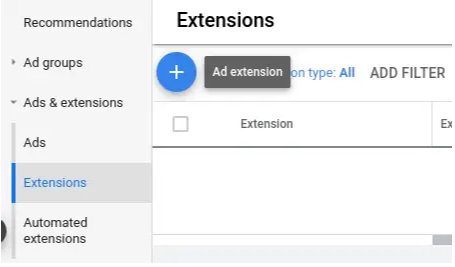
- Click Ads & Extensions in the page menu. Then click Extensions and the “+” icon.
 Select Call from a list of choices. The Add Call Extension view then appears.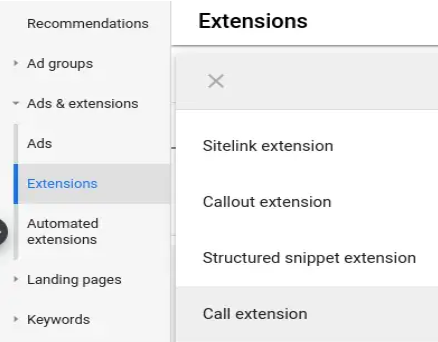
- Select whether you want to add the call asset to your Account, Campaign, or Ad group.
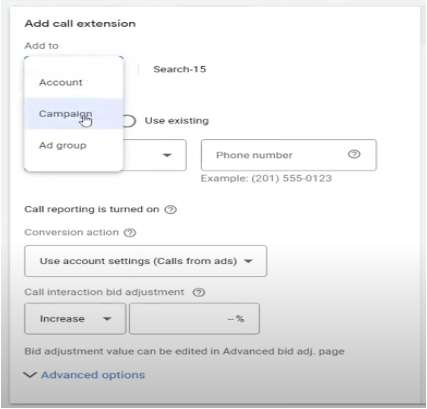
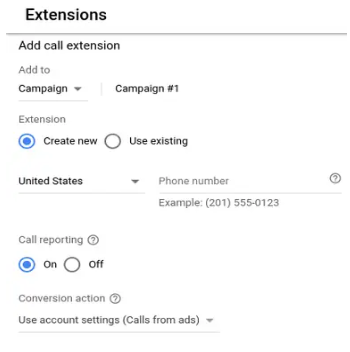
- Select Create new to make a new call asset, or Use existing if you’ve previously created a call asset.
- If you’re creating new extensions, enter your phone number.
- If you choose to use an existing extension, select your number from the list.
Benefits of Google Call Extensions
There are many benefits to using Google Call Extensions for your business, including:
- Increased conversions: By making it easy for customers to call your business, you can increase the chances of converting them into paying customers.
- Improved user experience: Providing customers with a quick and convenient way to contact your business can help to improve their overall experience and increase customer satisfaction.
- Better tracking and attribution: By tracking phone calls made through call extensions, you can gain valuable insights into your ad performance and measure the success of your campaigns.
- More control over ad spend: By setting up call-only campaigns or adjusting bids for call conversions, you can control how much you spend on phone calls and optimize your ad spend for the best ROI.
- Pro tip: If you want to focus on getting calls over lead forms or other types of conversions, you can choose bid adjustments and adjust the bid to get more phone calls.
Rules to Follow for Google Call Extensions
Your pay-per-click agency should be implementing these practices to fully optimize the use of Google Call Extensions:
- Use a dedicated phone number for call tracking: By using a separate phone number for call tracking, you can more accurately measure the success of your ad campaigns and identify areas for improvement.
- Use call-only campaigns: If your goal is to generate phone calls, consider setting up a call-only campaign. Doing so will only show ads with call extensions enabled.
- Optimize for mobile: The majority of searches are now being done on mobile devices. This makes it crucial to ensure that your website and landing pages are optimized for mobile users.
- Monitor and adjust your bids: By monitoring the performance of your call extensions and adjusting your bids accordingly, you can maximize your ROI and ensure that you are getting the most value for your ad spend.
Summary
In summary, Google Call Extensions can be the simplest and most effective method to generate leads and sales at a low cost. This extension makes the user experience easy and fluid for them to gain direct contact with your business.
You are also able to gain crucial insight into how well your ads are performing. For full ad optimization, make sure to follow the best practices section in order to help generate the best possible results.
At Tandem, we not only know about Google Call Extensions, but we have a plethora of knowledge when it comes to digital marketing. From PPC to SEO to Paid Social and more, we can help your company grow. Give us a buzz today to learn what our hive can do for you.