 Are you an e-commerce business looking to drive customers to your website? Look no further! Promotion Extensions are the perfect tool in Google Ads to attract clicks and boost sales.
These extensions show off your seasonal deals and special offers right below your ads, catching the users’ attention and encouraging them to find out more. In fact, Promotion Extensions have shown the highest increase in click-through and conversion rates compared to other ad assets. They are simple to set up and completely customizable.
Keep reading to learn how Promotion Extensions will help your ads reach their full potential while saving your company time and money.
What Does a Promotion Extension Look Like?
With eye-catching features like bold text and price tag icons, customers are drawn in and more likely to choose your business over the competition.
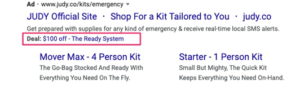
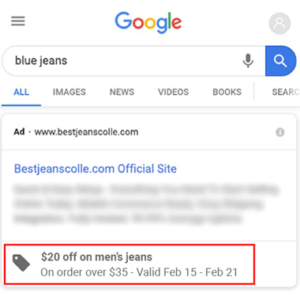
Details about your promotion, including valid date ranges, minimum order size, or promo codes, give customers the best information before they click, eliminating wasted spend on your ads.
Key Benefits of Promotion Extensions (Assets)
In the past, marketers had to write promotions into their ad text. This option seems simple, but requires manual updating, takes away valuable characters in your ad copy, and neglects to record customer data.
Across the board, Promotion Extensions can increase your ad’s profitability with minimal effort and no additional cost. Here are some key improvements that Promotion Extensions offer:
- Drive a higher CTR
- Expand real estate on the SERP
- Increase conversion rate
- Inform customers before they click
- Visually engage consumers
- Distract from the ads of your competition
Promotion Extensions will take your ad performance to the next level. With benefits like these, it’s no surprise that they are becoming one of the most common assets to use with your Google Ads.
How to Set Up Promotion Extensions (Assets) in 2023
Creating a Promotion Extension is quick and easy. Just follow these steps:
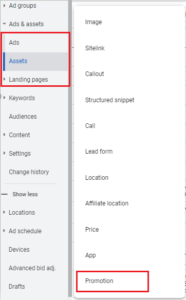
1. In your Google Ads account, navigate to your “Ads & Assets” drop-down and select “Assets.” Click the Blue + button to create a new asset and select “Promotion.”
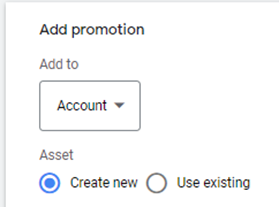
2. In the new window, select the drop-down and choose whether you want your promotion to run at the account, campaign, or ad group level.

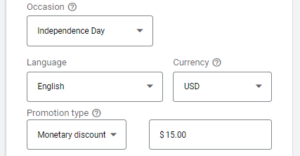
3. From there, apply custom options like occasion, language, currency, type of promotion, and the value of your discount.
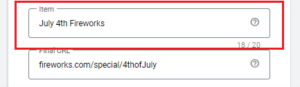
4. Next, enter a product or service (in 20 characters or less) so that customers know exactly what you’re offering.
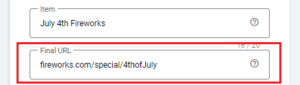
5. Below your description, add a URL link that will take users to that offer on your website.
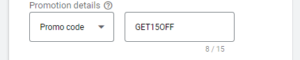
6. Select the drop-down to add optional promotion details like “on orders over $20” or promo codes to specify any requirements.
7. Lastly, select the date range you’d like your promotion to run (recommended) and click Save.
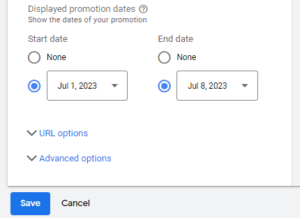
*Optional: If you select URL options, tracking parameters can be added to your promotion settings. Advanced options allow you to set your promotions to specific days of the week and times of the day. For example, if you have happy hour or weekend specials, these are great.
Promotion Extensions Best Practices
Match your promotion to the right URL or landing page.
Like sitelinks, promotions should take users to valuable pages within your site or a landing page. The details on these pages should match the details of your ad’s promotion and give users an easy option to purchase, subscribe, submit forms, etc.
If you fail to match the details of your promotion to the page where users are sent, Google will not show your Promotion Extension. For more information on matching ads to landing pages, click here.
Set start and end dates for your promotion.
Your Google Ads will only show your deals and offers when they’re set for. Schedule future promotions in advance and keep your current ads up to date without lifting a finger.
Again, if you fail to update the validity of your promotion, Google may penalize you and will not show your Promotion Extension.
Use Sitelinks Extensions to promote your deals also.
Using additional extensions like sitelinks will expand your ad on the SERP and will maximize your promotion’s effectiveness.
Promotion Extension Takeaways
With benefits like raising CTR and conversion rates, your ads have great potential when you attach promotion extensions. Promotions visually engage users, who now know exactly what deals you offer before they click.
If you have a promotion to offer your customers, let them know! Extensions work for your business, but they must be set up correctly. Fortunately, with these helpful tips and step-by-step instructions, you have everything you need to create Promotion Extensions. For more info on how to properly use Google Ads Extensions (Assets), click here.
If you want to learn more about Promotion Extensions or the vast services that Tandem provides, give us a buzz. We know PPC, SEO, reputation management, and more like the backs of our hands. Let our hive work for you!