
Before you begin using location assets (formerly known as extensions), let’s look at what these are and how they work.
Location extensions help users find your business by allowing you to show your business address, a map of your business’ location, or the distance your business is from the potential customer. All of this information will appear at the bottom of your ad.

Location extensions are a fantastic tool to draw customers to your brick-and-mortar locations. They will appear on search ads if added and can also appear in some display ads if the user is within your area.
There is also a chance that your location extension can appear on YouTube video ads. Applying location extensions to your ads is a must to maximize your ad account.
Reasons for Using Location Extensions
As a PPC specialist, you should do everything possible to maximize your ads. If applied properly, location extensions can significantly benefit local businesses.
Location extensions are shown to increase your overall click-through rate (CTR). If your CTR increases, the potential for acquiring conversions also increases.
In addition, location extensions make it easy for both mobile and desktop users to see where your business is located, and people like familiarity. This means if people continuously see where you are located, their potential to visit your business increases. It is the perfect tool to drive potential customers to your store and build trust among them.
Location extensions work even more effectively if other extensions are added to your ads, such as sitelink and call extensions. By adding multiple extensions, Google will increase your ad rank, which means the potential for conversions increases.
Even though setting up location extensions is not difficult, there are a few things that Google will require you to do before you get started.
Requirements to Add Location Extensions
- You must first set up your Google Business Profile (GBP), formerly known as Google My Business (GMB). Before adding location extensions to your ad account, you must set up a Google Business Profile account. This is the area where you will be providing basic information about your business. After adding this information, you must link it to your Google Ads account.
- Your business should have a physical location available for customers to visit, though this is not a requirement.
- Google requires you to use categories that describe your business.
- Use only one profile for your business to avoid location extension issues.
Adding Location Extensions:
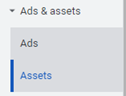
- Click the Ads & Assets tab in the page menu on the left and select Assets.
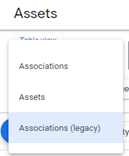
2. The Assets page will pop up. First, select Table View, then select Associations (legacy).
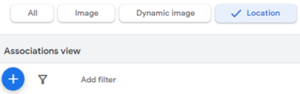
3. Continue by selecting Location and then clicking the blue, circular + button.
If you already have GMB linked to your google ads, you will be able to choose your location asset much more quickly.
Tandem and Local Extensions
There are many great assets that Google Ads provides you, and location extensions are a part of that. It is not difficult to set up, and the potential to improve your ad account can improve significantly. We recommend any PPC pro that is not using location extensions to give it a shot.
But what if you don’t have a PPC pro at your organization? Don’t worry. The hive at Tandem is here to help. In addition to our PPC specialists, we offer SEO, paid social, creative services, and more. Give us a buzz today and learn how we can make our digital marketing services work for you.