
When providing digital marketing services, our goal is to always increase our clients’ overall reach, clicks, and conversions. Using image extensions within our campaigns is an excellent way to promote physical goods and services. This helps our ads to stand out among competitors when displayed on any search engine’s results page. But you might be wondering, “What are image extensions?”
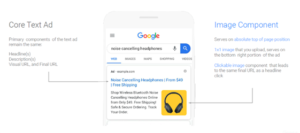
Image extensions or assets are a type of ad extension that can be applied to your paid search ads. These ad extensions can be applied at different levels, such as ad group level (all ads within a specific ad group) and campaign-level image extensions (all ads within a single search campaign). To fully optimize the capabilities of the search engine. We must pair our images with our defined keywords to ensure our ads can appear in relevant user searches.
Reasons to Apply Image Extensions
For PPC professionals, image extensions are a great way to enhance your text ads on Google. They can make these ads more visually appealing and engaging and, in turn, help drive performance. When using pay-per-click advertising services, these extensions typically generate higher click-through rates (CTRs) than other ad extensions.
What’s a benefit of using an image extension? Aside from generating a higher CTR, image extensions also help drive high-quality conversions to your landing page. They will also reduce your cost per click due to an improved quality score. If an ad does not have relevant image extensions, then a user may not immediately realize what you have to offer. This can cause wasted spending, increasing the CPA (cost per acquisition.)
Requirements to Add Image Extensions
You must first have an eligible Google Ads account, which means your account must have the following:
- The account has been open for 90 days or more.
- Spending on the account must have accrued for, at minimum, the last 28 days.
- An exceptional history of Google’s policy compliance.
- Campaigns and text ads that are active.
If all of these requirements have been met, you can opt into using the Google Ads image extensions.
Image Requirements
After you have met the account requirements, you can focus on the image guidelines. Google requires images to follow an aspect ratio of either a square (1×1) or an optional landscape (1.91×1). You can upload a maximum of 20 high-quality, relevant images.
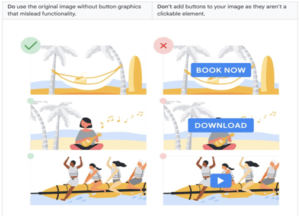
However, a few things are not allowed when adding image extensions, such as:
- Collages and GIFS (moving images)
- Images that contain photoshopped backgrounds
- Logos that are overlaid on top of the images
- Identical or similar images within the same ad
- Text that has been overlaid on top of the images
How to Create Google Ads Image Extensions
First, sign into your Google Ads account.
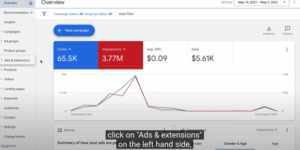
Next, on the page menu on the left, Click Ads & Extensions, then Click Extensions.
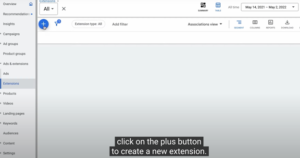
Click the plus button, and select Image Extension.
From the “Add to” drop-down menu, select a campaign or ad group you want to add your image assets to.
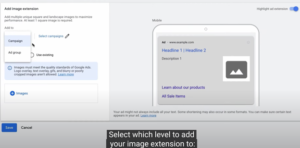
You will then be given the option to select one or multiple campaigns to which you would like to apply the image extension.
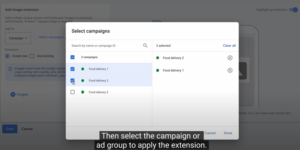
You can select:
- Create new – To add image assets, select “Scan website,” “Upload,” or “Recently used.”
- Use existing – Select existing image assets from any campaign or ad group in your account.
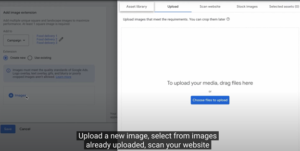
Follow the prompts to upload your images.
If any of your images don’t have an aspect ratio of 1:1 or 1.9:1, you must crop them before you can include them in your image assets. Click the image you’d like to crop, make any changes, and then click Continue. Repeat this step for each image.
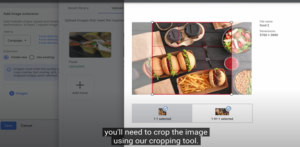
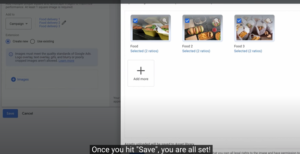
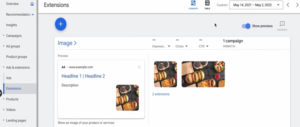
Image Extensions and Your Business
For PPC advertising agencies, Google Ads provides a wide variety of tools that can be used to help broaden reach, increase clicks, and drive quality conversions for your clients. Image extensions play a critical role in making your ad stand out from the rest on a very crowded and hectic search engine results page. However, they are just one of the extremely helpful tools Google Ads has to offer. Extensions like these improve the user experience, which leads to increases in clicks and conversions.
Our PPC professionals are well-versed in using a variety of extensions, display ads, and other pay-per-click marketing that can make your sales go from good to great. If you want to learn how to use Google extensions to benefit your business, give Tandem a buzz today. Learn more about our hive and how Tandem can start helping you today.