
Lead form extensions can be the most useful tool for generating high-value conversions for your campaigns when providing pay-per-click advertising services.
In this blog post, you will learn about the benefits and limitations of lead form extensions, how to create them, and how they work with your customer relationship management (CRM) software.
Lead Form Extension Requirements (Assets)
When creating a lead form extension, you must first make sure that you are meeting all of the following requirements:
- Your business has an active privacy policy with a link that directs people to it.
- An excellent history of policy compliance.
- A Google Ads account in an eligible sub-vertical or vertical.
Furthermore, suppose your goal is to add a lead form to any YoutTube, Display, Discovery campaigns, or search campaign where the ad’s headline directly opens to your lead form. Then you will need more than $50,000 (USD) for your total lifetime spend in Google Ads.
The Benefits of Lead Form Extensions (Assets)
PPC professionals can greatly benefit from using lead form extensions when providing digital creative services.
- They capture user information for B2B companies – Lead form data can be automatically uploaded to a CRM.
- They are great at capturing first-party data for remarketing purposes – Forms can be pre-populated with the user’s Google account.
- They improve user experience, especially if the site is not designed for optimizing conversions – Users can sign up for newsletters or make appointments directly from the ad.
- They generate leads that help drive sales for your business, product, or service – This will contribute to a higher conversion rate for your campaigns.
The Disadvantages of Using Lead Form Extensions (Assets)
When using any tool to help optimize your creative services, there are always going to be a few drawbacks, such as:
- Lead forms can only capture very basic data from the user – Data such as name, email, phone number, etc.
- If the lead form asks for too much personal information, the user will be less inclined to complete the form – This will reduce your conversion rate for your campaign.
- The use of lead forms has the potential to increase your cost-per-lead – Lead forms need to be followed up with a phone call or email since you are unable to have direct contact with the user while they fill out the form.
- Lead form extensions are only available in mobile search campaigns – they were designed to convert the mobile user without them having to leave the SERP.
It is always important to fully gauge your options before using any type of Google Ad extension. As a digital marketer, it is your responsibility to determine whether or not this is an effective strategy for your client’s campaign.
How to Create Lead Form Extensions (Assets)
When using lead form extensions, it is important to remember that you must have a clear and compelling call-to-action (CTA). This will help motivate users to fill out the lead form right away.
The lead form must only contain necessary information and be easy to complete. A good PPC specialist will incentivize the user with a discount or free trial once the form is submitted.
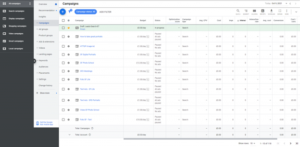
Step 1: Go to your Google Ads dashboard.
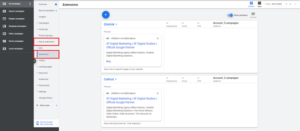
Step 2: Click on “Ads & Extensions” and click on “Extensions.”
Step 3: Click on the blue plus (+) sign.
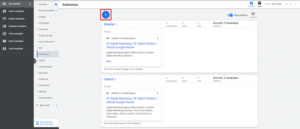
Step 4: Click “Lead Form Extension.”

Step 5: Select which campaign you want to choose.
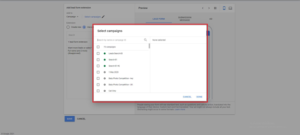
Step 6: Fill out all the ad copy, headlines, descriptions, questions, and background images.
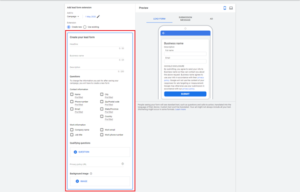
Step 7: Create a form submission message.

Step 8: Select a call to action for your ad.

Step 9: Integrate your CRM using the lead delivery option dropdown button (highly recommended.)
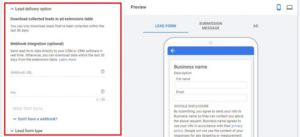
Step 10: Click Save.
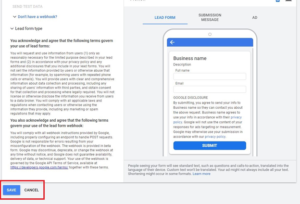
Once you have completed all these steps,your lead form will be up and running.
CRM Systems & Lead Form Extensions
Digital marketing professionals rely upon customer relationship management (CRM) systems to manage customer interactions and data throughout the customer lifecycle. This usually includes tracking interactions, storing customer data, and identifying sales opportunities.
Lead form extensions can be integrated with a CRM to expedite the lead management process. After a user fills out a lead form, the information they provide will be automatically added to the CRM, eliminating the need for manual data entry. This saves time and improves the accuracy of your customer data.
To integrate lead form extensions with a CRM system, you will need to use an integration tool or software compatible with the CRM system and Google Ads. Some popular CRM systems, such as Salesforce and HubSpot, offer native integration with Google Ads.
Alternatively, you can connect the two systems with a third-party integration tool such as Zapier. Integrating Google Ads Lead Form Extensions with a CRM system allows you to more effectively manage and follow up on leads generated through your Ads campaigns.
Learn More About Lead Form Extensions from Tandem
As digital marketers, our main goal is to drive conversions for our clients. Lead form extensions are a great tool for capturing first-party user data and improving user experience.
However, this tool only captures basic user data. It may require you to keep a closer eye on your budget since it can potentially increase your cost-per-lead.
Now that you have learned these PPC tips through lead form extensions, it is important to remember that your CRM should be fully integrated with your lead form extension.
That way, you can expedite the processing of all the conversions your lead form extension is generating. This will help save you time so that you can efficiently follow up with leads via phone call or email.
If you want to start using Lead Form Extensions, or other forms of pay-per-click marketing, give Tandem a buzz today. Our hive is full of digital marketing specialists who, in addition to PPC, are well-versed in SEO, Social, Creative, and more!