Before you begin applying structured snippets to your own ad accounts or to your clients, it is best to find out what exactly structured snippets are and how they work.
What Are Structured Snippets?
Structured snippets help your ads by emphasizing certain aspects of your business’ services. For example, if your business is a tech service company, then your structured snippet should have all the services you provide, such as tech support, e-waste recycling, computer repair, and the like.
Structured snippets will be shown under your main text ad.
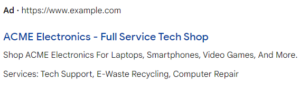
Structured snippets consist of two parts which are the header and values. From the image above, the service catalog would be the header, and the values would be what follows. There are different headers to choose from, so you can tailor the snippet to your business. Below is a list of all the headers you can choose from:
- Amenities
- Brands
- Courses
- Degree Programs
- Destinations
- Featured Hotels
- Insurance Coverage
- Models
- Neighborhoods
- Service Catalog
- Shows
- Styles
- Types
As you can see, Google provides many options to tailor these to your business.
What Are the Benefits of Using Structured Snippets?
Now that we know what structured snippets are, let’s talk about the benefits of using them. Whether you have just started or are a seasoned PPC professional, you should always be doing your best to optimize your ads. If used correctly, these are some of the benefits you can get from using structured snippets:
- They allow you to provide immediate information about your products or services.
- Like other extensions, using structured snippets increases your quality score.
- Your ad space is increased, which can result in a higher click-through rate (CTR).
- They are customizable, meaning that you can set them to show on specific dates, days, or times of the day.
- Quality of leads is increased since you can give the potential customer a quick preview of your service or product before they click on your ad. This means that if they click, their click has a higher chance of converting.
How to Add Structured Snippets to Your Google Ads Account
Click the Ads & Assets tab in the page menu on the left, then from the drop-down, select Assets.
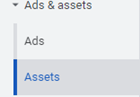
- The Assets page will appear. At the top, you will see Assets that you can add to your ads. Select Structured snippet.

- From here, click the blue + button to add the structured snippets. Once you click this button, it will take you to a page where you can edit the structured snippet. This is where you fill out the information and tailor the structured snippet to your business. It is recommended to create multiple structured snippets to allow google to learn which one is the best one for you. Here, you can fill out the information and tailor the structured snippet to your business.
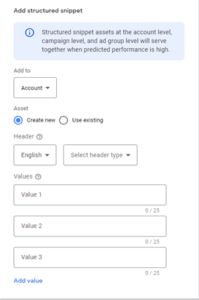
3. Once you have filled out the structured snippet, you can choose if you want to apply it to the Account level, Campaign level, or Ad Group level. Once you have decided, click save, and your structured snippet will be activated.
Structured Snippets and Tandem Together Bring Value
For any PPC specialist, whether you are one with years of experience or you are just beginning on your journey, applying any type of extension to your ads is a must. Structured snippets bring significant value to your account, and they are not hard to set up. We highly recommend applying them to get the most out of your ads.
If you want to learn more about Structured Snippets Extensions (Assets) or some of the services that Tandem provides, give us a buzz. We know PPC, SEO, reputation management, and more like the backs of our hands. Let our hive work for you!