 The ThinkWithGoogle.com website describes location assets. Whether you are a brick-and-mortar business or a multi-channel business, location extensions can help you attract customers to your location. In addition, adding location extensions to your campaign has been shown to increase click-thru rate (CTR) by 10%.
Increase CTR by 10%? Let’s dissect each part of the above statement for a minute.
- Location extensions can help brick-and-mortar businesses, but even though these extensions can help, that doesn’t necessarily mean that they do help. The reason is that even though you may have a store location, clients may not necessarily need to visit it. Examples abound – from plumbers to HVAC professionals to movers – these businesses don’t need people to visit their stores to book their services. Even so, Google Ads recommends agencies and business owners add location extensions to these accounts.
- Sure, a 10% increase in CTR might be possible by adding location assets to your campaign. The question is, is it worth it? A higher CTR does not necessarily mean that you will get more conversions. With location extensions, it gets even trickier because it is very difficult to attribute those clicks to actual conversions. That’s because those clicks go to Google Business Profiles, and people have many different possibilities when they get there:
- They can request directions. Not many serious marketers would consider asking for directions to be a conversion, although Google does.
- They can call your store. That’s indeed a conversion, but unless it’s set up correctly, a call will be attributed to SEO and not PPC.
- They can go to the website. Anything can happen here. They can convert, they can just do research, or they can get distracted and never go back.
After reading this article from LearnDigitalAdvertising.com, it convinced me that paying for Google ads extensions made little sense to so many of our clients. Even for those that received visitors, it didn’t make sense because their cost per lead (CPL) was too high or their budget was too small to spend on something as trivial as location extensions. These are just some examples.
Everything You Need to Know About App Extensions (Assets)
App assets (formerly known as extensions) are a valuable resource that Google Ads provides for PPC professionals. However, before applying app assets to your campaigns, let’s take a look at what they are and how they work.
What Are App Assets?
First, it’s important to understand that app assets are not for everyone because not all businesses have their own applications or apps. Only use app assets if you have a phone app and you want to direct your customers to download it.
App assets provide a direct link to your application. They are shown only on search ads and only on mobile or tablet devices. Since you cannot download the same app to your computer, Google knows not to show these on such devices. App assets send your potential customers to either the App Store (Apple/iOS) or the Google Play Store. On either of these, they will see the description of your app.
Like all other Google Ads assets, app extensions are free to use. You will only be charged if someone clicks on the app extension and can add them to the account level, campaign level, or ad group level.
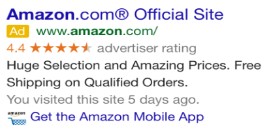
App assets are shown under your main text ad. This is illustrated in the image below with the text “Get the Amazon Mobile App.”
Requirements to Add App Assets
There are a few steps that are required before you can apply app assets properly to your accounts.
- You or your client must have an application that is up and running on either the Google Play Store or the Apple App Store.
- You need the app ID for iPhones or Apple devices (both of which use iOS) or the package name for Android devices.
- You need the URL for the page in the app store where potential users can find out more information about your app or they can click to install the app.
After checking to see if all the requirements from the list above are met, you can add app extensions to your accounts.
How to Add App Assets to Your Google Ads Account
Click the Ads & Assets tab in the page menu on the left, then from the drop-down, select Assets.
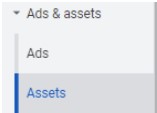
The Assets main dashboard will appear. At the top, you will see all the different asset types that you can add to your ads. Select App.
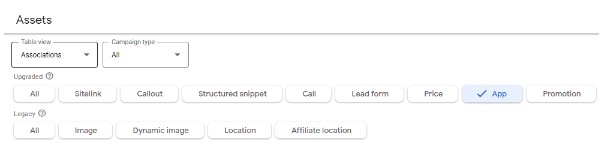
Under Upgraded, select App, then click the blue + button to add your app asset. Once you have clicked the button, you will be taken to a page where you can fill out and edit the information for your app asset.
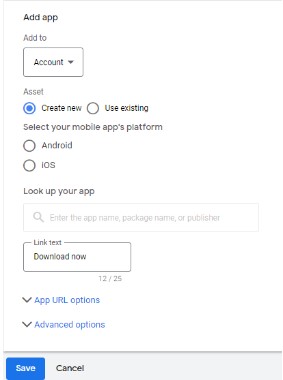
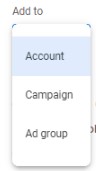
You can also choose if you want to add the app asset on the account level, campaign level, or ad group level.
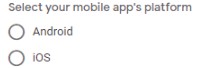
Next, you will select on which platform your app appears. The choice is between Android and iOS.
After selecting your app’s platform, you will need to fill out the link text box. We recommend putting a call to action (CTA) here.
 Once you have filled out all the required fields, select Save. You are done, and the app asset you have made will be live.
App Assets and Tandem Together Bring Value
Google Ads provides many great assets that you can add to your ads in order to improve your online advertising strategy. Although app assets might not be as commonly used as image extensions or structured snippets, they still provide great value. Any PPC specialist should be applying app assets for a client or business that has its own application.
But what if you don’t have a PPC specialist at your organization? Don’t worry! The hive at Tandem is here to help. In addition to our PPC specialists, we offer SEO, paid social, creative services, and more. Give us a buzz today and learn how we can make our digital marketing services work for you.