 Many digital marketers understand that SEO is not one-size-fits-all and that new challenges can appear out of thin air. Recently, Tandem’s client, All My Sons Moving & Storage, experienced such a challenge. With almost 100 locations serving over 30 states, their website exceeds 9,000 pages. That’s a lot of pages to oversee. Fortunately, Tandem is well-equipped to perform digital marketing for websites, regardless of how large or small they are.
Early in October 2023, Google’s Universal Analytics stopped tracking. GA4 has been installed for over a year and we have been using that data. Within days, organic traffic significantly dropped off without a correlating drop in Search Console. We knew something was causing a tracking problem.
Universal Analytics Has Transitioned to GA4: Now What?
When Universal Analytics, the predecessor to GA4, was still in use, the All My Sons Moving & Storage website and the pages for each of the many locations needed JavaScript hard-coded into the backend. Though some websites use WordPress as their CRM, this site is built on Sitecore. One CRM isn’t necessarily better or worse than the other. However, the way they function, especially when interacting with Google tools, is different.
With this in mind, a JavaScript code was loaded to the client’s website years ago. This script enabled us to see the overall performance in Universal Analytics by using a category. We did this because it was easier to place the code in a Sitecore template than it would have been to use a page naming convention.
Everything Happens For a Reason
In October 2023, we saw a drop in GA4 traffic on the All My Sons Moving & Storage website. We know that traffic changes don’t just happen by chance. If there is a significant change in traffic, there has to be a cause for the difference. Luckily, we were able to find what that cause was.
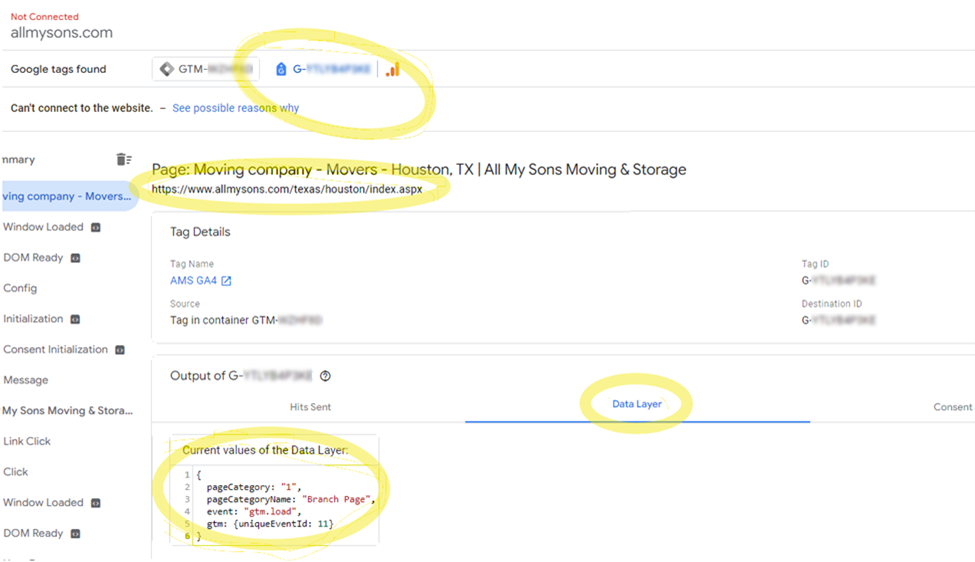
Unfortunately, Universal Analytics stopped reporting on October 5, 2023. It seems that stopping the reporting wasn’t the only change. In addition to the reporting changes, GA4 was processing the data layer information differently. Instead of passing the information on, it was stepping on it.
This is what our reporting looked like when we noticed a drop in traffic:
Identify the Problem, Find a Solution
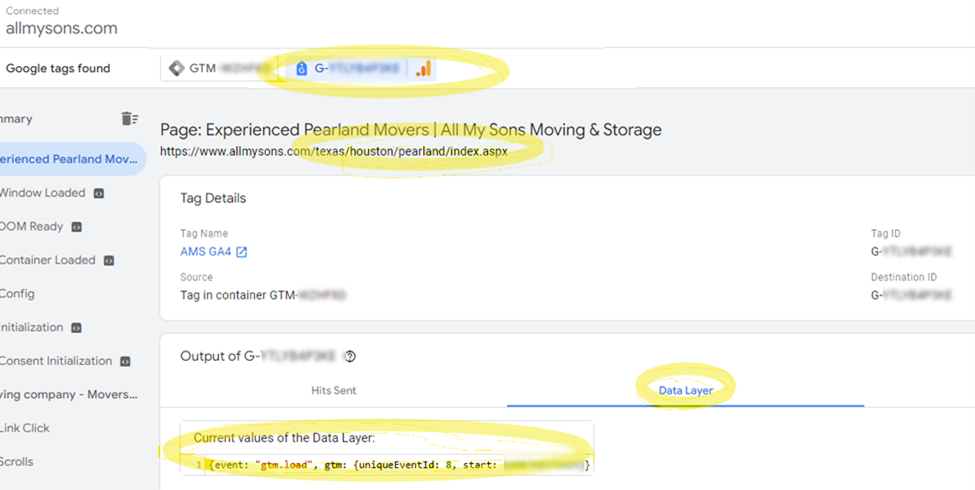
Now that we had identified the problem, we needed to find a solution. So how did we fix it? The first thought was that the noindex GTM snippet was inside of a div after the open of the body section in the HTML. That was changed without any result. Then the custom page category dataLayer script was removed and… bingo!
Here is what the tag looks like now that the old JavaScript has been removed:
Tandem isn’t done yet. Our next step will be a major Google Tag Manager cleanup. We’ll be removing all Universal Analytics tags and deleting old Google Optimize tags, rules, variables, and the like.
The More You Do, the More You Learn
What did we learn from this experience? When it comes to SEO, change is inevitable. That doesn’t mean that change is bad. When Google upgrades its Analytics or significantly changes its algorithms, users should expect to see some changes. But by staying on top of these changes, as Tandem does, you can keep minor discrepancies from becoming major problems.
Let Tandem Get to Know Your Business
Tandem knows much more about Google Analytics, Google Tag Manager, and Google Search Console than we can fit in one blog. We are an award-winning digital marketing agency with a team that’s the best in the business. We handle search engine optimization (SEO), pay-per-click marketing (PPC), online reputation management (ORM), and much more.
As the President and founder of Tandem, I am personally involved in all our accounts, overseeing them to ensure that we deliver only the best for our clients. If you want to partner with digital marketers who can make your business buzz, call me on my cell phone at 954-662-8076. The hive and I look forward to you becoming our next success story.
Additional Resources
- Add Blogs or Articles
- Add Blogs or Articles
- Add Blogs or Articles