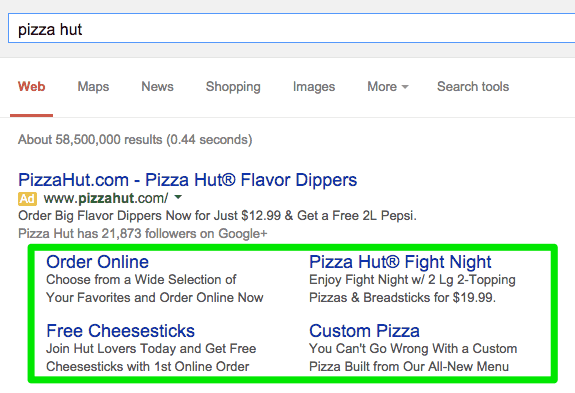
Google Ads offers a number of features known as ‘assets’ (formerly known as extensions) that drive traffic and significantly improve the performance of ads.
These assets come in a variety of formats, such as callouts, structured snippets, locations, images, and, the most popular among advertisers – sitelinks. If you are thinking about adding assets to your ads, sitelinks are an excellent place to start.
Sitelinks are additional links that appear below your search ad’s text and take users to valuable pages within your website. These assets help by catering to a more specific search intent and collecting detailed customer information without any additional cost to you.
Even though they offer quality benefits, sitelinks must be implemented correctly, or they can end up hurting your ad performance.
Things to Consider Before You Start
Before creating sitelinks, you should first review your business and marketing objectives. Are you trying to increase brand awareness or generate leads, or would you like to drive sales and reach new customers? Your sitelinks should honor your specific goals and help you to achieve them.
In most cases, Google will only show sitelinks for optimized websites. The sitelink asset was created to simplify the navigation process for users, so if Google’s algorithm feels your assets will hinder the user experience, sitelinks will not show.
This can happen due to a poorly structured site, limited content, or lack of relevance to the search query. For this reason, enhancing your website and connecting accurate landing pages will give your assets the best chance of showing with your ads.
Best Practices
- If you are creating sitelinks for the first time, start at the account level to save time. This will apply sitelinks to every search ad simultaneously. Be sure to check that these account-level assets will serve each individual campaign and ad group. If they do not, account-level sitelinks can be removed from a campaign or ad group independently. More specific sitelinks can then be created at the campaign level or ad group level.
- Your sitelinks and their descriptions should accurately tell the user what page they will be connected to. For example, a “services” sitelink should not take users to a homepage. However, sitelink titles should be short and concise so that Google can fit as many as possible below your ad.
- Uploading a variety of sitelinks offers a user more options to navigate, gathering comprehensive information and improving your CTR. In other words, you shouldn’t only promote new products with your sitelinks, but instead maybe offer an on-sale item, a ‘more information’ option, technical support, a new product category, a ‘contact us’ sitelink to generate leads, and similar.
- The number of sitelinks you create is also important. If you have enough information on your site, it is recommended to include 8 to 10 sitelink assets. Google can show a minimum of 2 and a maximum of 6, but it is recommended you never include less than 4 sitelinks. The more sitelinks you show, the more space your ad can take up in the SERP, knocking competitors further down the page and getting more of the user’s attention.
- Lastly, tracking sitelinks will let you know which sitelinks perform well and which may need adjustments. Setting conversion tracking to “light” conversion events or secondary conversions will allow this data to be observed. These assets are very easy to update and won’t lose any collected data due to changes.
Have Tandem Do the Best Sitelink Extension Practices for You
To sum up, sitelinks are a great tool in Google Ads that will improve the performance of your advertisements.
The most important things to remember about sitelink extensions are:
- Create sitelinks at the account level first, then tailor them to each campaign or ad group.
- Titles and descriptions should explicitly tell the user what page they will be taken to.
- Utilize a variety of sitelinks that give users a variety of navigation options.
- Try to implement as many sitelinks as your website content allows.
- Set up sitelink conversion tracking for periodic updates and data analysis.
Overall, if sitelink assets are created correctly and kept up to date, they should enhance your ad performance considerably.
To learn more about how Tandem can help you implement sitelink extensions properly or for any of your PPC needs, give us a buzz today. Our digital marketing agency can also assist with SEO, paid social, creative services, and more. You can also read some of our other blogs to find out more from our hive.